
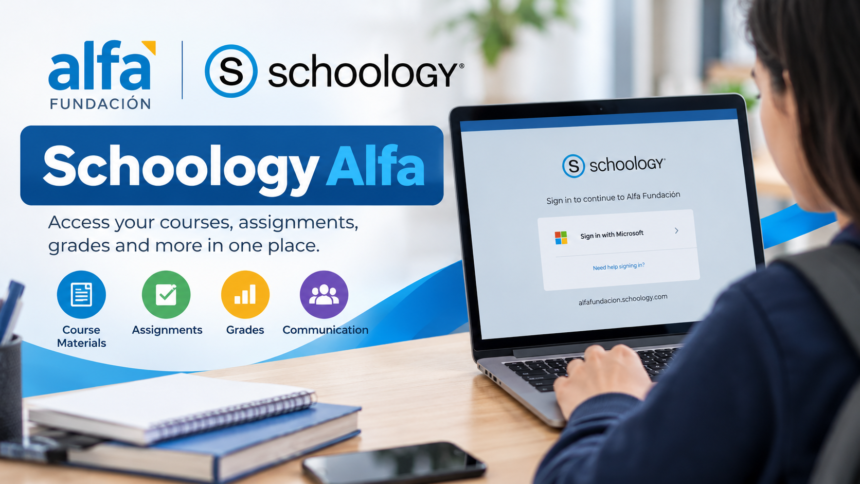
Schoology Alfa refers to the Schoology learning environment associated with Alfa Fundación, an educational organization based in Monterrey, Mexico. It provides an institution-specific way for authorized users to access digital learning tools, including course materials, assignments, announcements, and academic information. Schoology Alfa is not a separate learning management system. Instead, it uses Schoology Learning, the educational platform offered by PowerSchool. Students and teachers searching for Schoology Alfa are generally looking for information about accessing their educational accounts and managing coursework through this system.
At a Glance
| Information | Details |
|---|---|
| Common name | Schoology Alfa |
| Platform | PowerSchool Schoology Learning |
| Associated organization | Alfa Fundación |
| Organization location | Monterrey, Nuevo León, Mexico |
| Platform category | Learning Management System (LMS) |
| Main users | Students and educators |
| Core functions | Course management, assignments, assessments, grades, and communication |
| Institutional login | alfafundacion.schoology.com |
| Access requirements | Institution-authorized account |
| Official organization website | alfafundacion.org |
What Is Schoology Alfa?
Schoology Alfa is an institution-specific online learning environment connected with Alfa Fundación. It uses Schoology’s learning management technology to support the organization and delivery of educational activities.
Schoology Learning allows teachers to create digital courses, distribute educational materials, collect assignments, administer assessments, and communicate with students. Learners can access the resources made available to them and follow their academic responsibilities within individual courses.
The word “Alfa” identifies the educational organization associated with this particular Schoology environment. It does not represent a special software edition, an artificial intelligence product, or an independent platform developed separately from Schoology.
The distinction is important because some websites describe Schoology Alfa as a newly developed educational system with exclusive features. Publicly available official information does not establish those claims. The underlying software is Schoology Learning, while Alfa Fundación manages its own educational environment and access arrangements.
The Connection Between Schoology and Alfa Fundación
Alfa Fundación is an educational initiative dedicated to supporting academically talented students from communities in the Monterrey metropolitan area. Its mission focuses on expanding educational opportunities and encouraging social mobility through academic development.
The foundation’s educational structure includes extracurricular learning centers, a high school program, and support for students pursuing university education. Its programs emphasize subjects such as mathematics, science, English, and Spanish, alongside broader academic development.
Schoology provides a digital framework through which educational organizations can manage teaching activities and learning resources. For an institution such as Alfa Fundación, a dedicated Schoology environment gives authorized users an institution-linked point of access to their courses.
However, the exact courses, administrative rules, and available functions are determined by the organization. Access to the platform should not be confused with admission to Alfa Fundación’s educational programs.
How to Access Schoology Alfa Login
To access Schoology Alfa, students and teachers should use the login address provided by Alfa Fundación or their educational administrator.
The institution-associated Schoology portal is available at:
The portal redirects users to Microsoft’s authentication service. This means authorized users may need to sign in using their institution-approved Microsoft account rather than an ordinary Schoology username and password.
Step-by-Step Schoology Alfa Login Guide
- Open a browser and visit the Alfa Fundación Schoology portal.
- Follow the institutional sign-in page that appears.
- Enter the school account credentials provided or approved by your organization.
- Complete any additional authentication requested.
- After successful sign-in, open your available courses and learning materials.
The exact login screen may change according to the organization’s authentication settings.
Students should avoid entering their passwords on unfamiliar websites advertising Schoology Alfa access. A website appearing in search results is not necessarily an official login service.
Main Features of Schoology Alfa
The features users encounter through Schoology Alfa come from the underlying Schoology Learning platform. PowerSchool provides tools for managing instructional content, assignments, assessments, and academic communication.
Actual availability depends on Alfa Fundación’s configuration and each user’s permissions.
1. Course Materials and Digital Lessons
Schoology organizes educational materials into individual courses. Teachers can upload documents, create pages, share links, and arrange instructional resources in folders.
Students can open their assigned courses to find the materials needed for lessons and independent study. This structure helps keep information associated with the correct subject or class.
2. Assignment Submission
Assignments are an important part of Schoology Learning.
Teachers can create tasks, provide instructions, establish deadlines, and specify acceptable submission methods. Students can then complete and submit their work through the available assignment interface.
Depending on the activity, submissions may include uploaded documents, typed responses, or other supported formats.
The PowerSchool assignment documentation explains how teachers create assignments and manage submissions.
3. Assessments and Grades
Schoology supports educational assessments and grading workflows. Teachers can evaluate submitted work and provide feedback through the platform.
Students may be able to review their grades, assignment results, and teacher comments. These details help identify completed work and academic areas requiring further attention.
However, Schoology grades should not automatically be assumed to represent an institution’s final official academic record. Schools may maintain additional grading systems.
4. Announcements and Communication
Schoology allows teachers to publish course updates and share information relevant to class activities.
Announcements can help students stay informed about upcoming lessons, assignments, academic events, and changes in course requirements.
Other communication functions, including discussions and messaging, depend on the permissions and settings established by the institution.
5. Calendars and Upcoming Work
Schoology includes calendar and upcoming-work functions that help users follow academic deadlines.
When teachers assign due dates, students can review relevant upcoming activities instead of relying entirely on handwritten reminders.
For students managing several subjects, regularly checking upcoming assignments can make coursework easier to organize.
How Students Can Use Schoology Alfa Effectively
Students benefit most from Schoology when they use it consistently rather than accessing it only when an assignment is due.
A practical routine begins by checking the course dashboard and reviewing recent announcements. Students should then open each active course, identify assignments approaching their deadlines, and read the instructions carefully.
Before submitting an assignment, it is important to confirm that the correct file or response has been attached. Students should also verify that the submission was completed successfully.
After their work has been evaluated, reviewing teacher feedback can be just as valuable as checking the grade itself. Comments may explain mistakes, suggest improvements, or identify concepts requiring additional practice.
Regular use of these functions helps students maintain a clearer picture of their academic responsibilities.
Schoology Alfa for Teachers and Parents
How Teachers Use the Platform
Schoology Learning provides teachers with tools for preparing and organizing educational activities.
Teachers can structure course materials, publish assignments, establish deadlines, evaluate student work, and provide feedback. They can also use supported assessment and discussion features when those capabilities are enabled.
For Alfa Fundación educators, the precise workflows depend on the organization’s academic requirements and the permissions assigned to their accounts.
Can Parents Monitor Student Progress?
Schoology includes parent and guardian account features that can provide visibility into a student’s educational activities.
Where an institution enables these features, parents may be able to review course information, upcoming assignments, grades, and teacher feedback.
Parent accounts are primarily intended for monitoring and communication, not completing assignments on behalf of students. PowerSchool explains these distinctions in its Schoology parent documentation.
Whether Alfa Fundación provides parent accounts, and how those accounts are activated, must be confirmed directly with the institution.
Can Schoology Alfa Be Used on Mobile Devices?
Schoology offers mobile applications for supported iOS and Android devices. These applications allow authorized users to access various learning management functions without always using a desktop computer.
Depending on their accounts and course settings, students can access course materials, view academic updates, and work with supported assignments through mobile devices.
To use an institution-specific account, users should select the appropriate school or domain and follow the required authentication process.
PowerSchool’s official mobile login instructions explain how organization-based sign-in works.
Some administrative functions and learning tools may be available only through a browser. Therefore, the mobile application should not be assumed to provide every feature found in the desktop experience.
Common Schoology Alfa Login Problems and Solutions
Access problems can occur because of incorrect credentials, account permissions, authentication settings, or browser-related issues.
Incorrect Username or Password
Make sure the account information matches the credentials approved by your institution.
If Alfa Fundación uses Microsoft authentication for your account, follow the organization’s Microsoft password-recovery instructions rather than assuming that a standard Schoology password reset will work.
Login Page Keeps Redirecting
Institutional single sign-on can involve several redirects between Schoology and an authentication provider.
If the process fails repeatedly, try reopening the institution-approved address, checking that the correct Microsoft account is selected, or using an updated browser.
Persistent authentication problems should be reported to the institution’s technical support contact.
Courses Are Missing
A successful login does not necessarily mean that every expected course will be visible.
Course availability can depend on enrollment records, class schedules, permissions, and publication settings. Students who cannot find an expected course should contact their teacher or academic administrator.
Assignments Are Not Appearing
An assignment may not be visible because it has not been published, its availability is restricted, or the student is viewing the wrong course section.
Students should check the course materials and upcoming-work areas before contacting their teacher for clarification.
Important Limitations of Schoology Alfa
Although Schoology provides extensive educational tools, not every function is necessarily available in every institution.
Administrators can control user access and enable different features. Teachers may also organize course content differently, meaning students can encounter different layouts across subjects.
There is also no confirmed separate public product named Schoology Alfa with its own exclusive features, subscription plans, or independent application.
Users should rely on official institution instructions for account access and use PowerSchool’s documentation for information about the underlying learning management software.
Frequently Asked Questions About Schoology Alfa
1. Can anyone create a Schoology Alfa account?
Schoology Alfa is associated with an institution-specific environment. Access depends on the account arrangements established by Alfa Fundación. People who are not authorized members of the educational community should not assume that public registration is available.
2. Why is my Schoology Alfa course not showing?
A missing course may result from enrollment settings, account permissions, unpublished materials, or an incorrect course association. Contact your teacher or institutional administrator to verify that your account has access to the expected class.
3. Does Schoology Alfa require a separate mobile app?
No separate Alfa-branded application has been established. The underlying platform is Schoology Learning, which provides official mobile applications. Users should follow their institution’s instructions to connect the appropriate account.
4. Are grades displayed in Schoology Alfa official final grades?
Not necessarily. Schoology supports grading and feedback, but an institution may use a separate student information system for official results. Students should confirm which grade record Alfa Fundación recognizes as authoritative.
Conclusion
Schoology Alfa is best understood as the Schoology learning environment associated with Alfa Fundación in Monterrey, Mexico. It gives authorized educational users access to Schoology’s course management, assignment, assessment, and communication tools, according to the institution’s configuration.
For students and teachers, the most important steps are to use the correct institutional login, understand the available course features, and follow official account instructions. By regularly checking coursework, deadlines, submissions, and feedback, users can make more effective use of the learning environment.